





Choose a CMMS that your team will actually use.
A practical guide to evaluating maintenance software. Compare vendors against a structured set of requirements, avoid the common pitfalls, and pick a system you won't regret in three years.
14 evaluation areas mapped to a downloadable spreadsheet you can send to vendors. Plus the questions to ask, the pitfalls to avoid, and how to run a comparison that gives you a real answer.
Two situations that mean it's time to look.
Most teams know the answer before they say it out loud. If any of the signals below match your week, the cost of staying put has probably already overtaken the cost of switching.
You're still on paper or spreadsheets.
You have a CMMS,
but it's not working.
You can't get reports out without involving IT.
Get the right people in the room early.
Most CMMS implementations fail at adoption, not at procurement. The single best predictor of success is whether the people who'll use the system every day were part of choosing it.

Maintenance manager
The champion. Owns the business case and the rollout. Probably reads this guide.
Maintenance technicians
The end users. Most often forgotten in vendor selection. If they're not in the demo, you're choosing a system for someone who won't use it.
Production / operations
The champion. Owns the business case and the rollout. Probably reads this guide.
IT
Cares about security, integrations, and hosting. Will block the deal if these aren't right. Bring them in early.
Procurement and finance
Reads the contract. Cares about pricing model, term, termination, and what's included vs. extra.
HSE (when relevant)
If permits-to-work, risk assessments, or audit trails matter in your industry, HSE has veto power. Better to know that on day one.
Asset management
Your asset hierarchy is the spine of everything else.
A hierarchy with at least 5 levels (site, building, area, line, machine, component). Customer-defined fields. Quick retrieval by search, hierarchy, or QR / barcode scan. Documents, spare parts, and full work order history attached to each asset.
Vendors who insist on their own asset taxonomy without flexibility.
Work orders and planning
Work orders are 80% of the daily use. Get this right or get nothing right.
EN 13306-aligned categories (corrective, preventive, improvement, modification). Customer-defined types and priorities. Multi-step work with sequencing rules between steps. Permits-to-work and risk assessments built in, not bolted on.
Demos that only show happy-path corrective work. Ask to see a multi-step planned job with a permit.
Mobile and field operations
Technicians spend most of their day away from a desk.
Native iOS and Android apps. Offline mode that syncs when reconnected. QR or barcode scanning to pull up the asset card. Voice-to-text for short notes.
Vanity dashboards on tablets. They look great in demos but no one uses them daily.
Inspections and condition-based work
Where compliance gets won or lost, and where preventive maintenance pays back.
Configurable inspection forms with pass / fail / remarks. Failed results that automatically trigger work orders. IoT sensor integration with customer-configurable triggers when you're ready.
Pre-built inspection templates that don't match your equipment. You'll customise everything anyway.
Spare parts and stockroom
Stockouts cost more than the spare parts. So does over-stocking.
Classification (consumables, consumable spares, insurance spares). Reorder rules with automated suggestions. Multiple stockroom locations. Supplier links from the parts record.
Generic warehouse management features that fight your existing ERP.
Analytics and audit
KPIs that match your industry's standards, and an audit log you don't need IT to read.
Standard maintenance KPIs out of the box (MTBF, MTTR, MWT, backlog, On-Time Delivery). Configurable dashboards by role. End-user-visible audit log showing what changed, when, and by whom.
Beautiful charts that don't filter the way your team actually works.
Configuration
Every CMMS needs configuration over time. The question is whether you can do it yourself.
No-code configuration of fields, forms, value lists, completion codes, and workflows by your administrators. Ask whether typical changes require vendor billable services.
"Highly configurable" claims without specifics. Ask for a worked example.
Users and access
Cost is per-user. The wrong licensing model can double the cost.
Role-based access with per-user overrides. Single sign-on (SAML 2.0 or OIDC) and MFA. A low-cost licence type for occasional users (production staff who only raise fault reports and check status).
Per-feature pricing. It always ends in surprise costs.
Integrations
A CMMS that doesn't talk to your other systems creates more work, not less.
Open REST API with public documentation. Webhooks for event-driven integration. Named pre-built connectors for ERP. Integration with OEE, MES, SCADA where you have it.
"Integration available" without specifics. Ask which named systems and where the documentation lives.
Standards and accessibility
Standards alignment means your industry uses the same vocabulary. Accessibility is now legally required in the EU.
EN 13306 (Maintenance) and EN 15341 (Maintenance KPIs) alignment out of the box. WCAG 2.2 AA conformance (the European Accessibility Act came into force in June 2025).
"Compliant" without naming the standard.
Security and data protection
A breach in a maintenance system can leak operations data, contracts, and personnel records. IT will block the deal if this isn't right.
ISO 27001 or SOC 2 (the vendor states which). GDPR with a DPA available. Data residency options. Encryption at rest and in transit, with named standards.
Vague claims about "cloud security". Ask for the actual certifications.
Hosting and availability
Downtime in your CMMS during a breakdown is the worst time for it to fail.
Named hosting provider (AWS, Azure, GCP). Stated uptime SLA. Recovery Point Objective (RPO) and Recovery Time Objective (RTO). Backup frequency and retention.
"Highly available" without numbers.
Implementation and support
A 12-month implementation is a different deal than a 2-month one. Customer time matters.
A described methodology and typical duration. A customer-effort estimate in days, not weeks. Training options. Support that doesn't meter per ticket.
Ambitious timelines without resourcing detail.
Commercial and contractual
The price you see in the proposal is rarely the price you pay over five years.
Clear pricing model. What's included in the subscription vs. priced separately. Implementation fees stated up front. Termination terms and data export on exit.
Verbal assurances. Get it in writing before signing.
Run a structured process, not a feature beauty contest.
Most CMMS demos are designed to dazzle. Yours should be designed to compare. Four steps that work.
01
Send the same template to 3-5 vendors.
Use the requirement template above. Same questions, same priorities, same scoring. Anything else is comparing apples to mangoes.
02
Demo with your scenarios, not theirs.
Bring two real work orders from last week. Ask the vendor to walk through them in their system. The polished demo path tells you nothing. Watching them adapt tells you everything.
03
Reference calls with three good questions.
"What was harder than expected?" "How long was your team's actual involvement, in days?" "Has the system changed since the demo we'd see today?" Skip the testimonials, get the texture.
04
Run a pilot if the contract is significant.
30 days, one site, real users. Most serious vendors will agree. The ones that won't are telling you something useful.
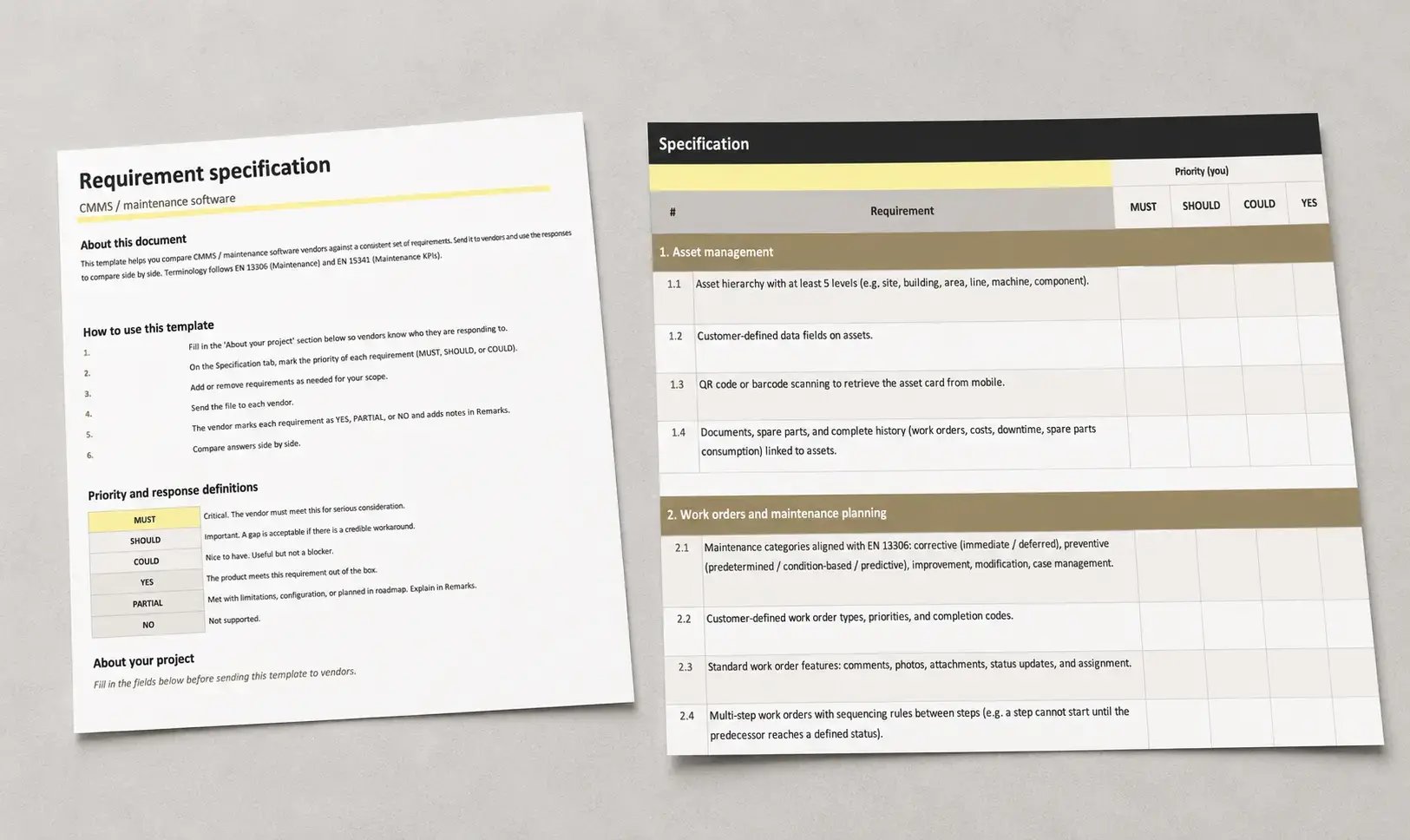
Get the actual spreadsheet, with all 51 questions and the scoring sheet.
Send it to 3–5 vendors. Same questions, same priorities, same scoring. Compare apples to apples, not apples to mangoes.
Get the right people in the room early.
Most CMMS implementations fail at adoption, not at procurement. The single best predictor of success is whether the people who'll use the system every day were part of choosing it.
Buying on feature count alone.
Most CMMS products tick most boxes. The differentiators are in how features behave under real conditions, not whether they exist.
Ignoring change management.
The best system fails if technicians don't open it. Plan adoption before signing the contract, not after.
Underestimating customer time.
Implementation effort is rarely just the vendor's work. Ask for a customer-time estimate in days, by week. If they can't give you one, that's the answer.
Modular pricing creep.
Mobile costs extra. Spares is a module. IoT is upsell. Get a quote that lists what's included vs. what's extra, in writing, before signing.