


When a production line stops and an operator has to choose from 40 downtime codes in under 30 seconds, most of them pick "Other" and move on. It is the fastest option. It causes no argument.
But if you are responsible for production efficiency, you have a problem to address. "Other" is not a category. If you see it frequently on your reports, your categorisation system is ready for redesign.
The clash between vague reports and reality
In our recent webinar, we showed a factory line recording an OEE of 79.3%, with unplanned downtime summarised as "Other – 18 min". The note told us that a line stopped. What it didn’t tell is who owns the fix, what caused it, whether it happened last week, or whether the same shift logged it the same way.
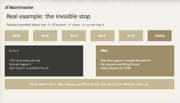
What the floor actually knew that shift: a 10-second sensor trip firing every 6 minutes, a speed reduction after changeover that was never reset, short stops cleared before anyone logged them, and Shift 2 coding everything as "Other".
Over time, the discrepancy quietly destroys the reliability of your OEE numbers.
5 symptoms of a broken category system
Are you recording downtime data but getting reports that say nearly nothing? If you recognise any of these in your reports, a better categorisation will bring concrete results soon.
1. Almost no short stops recorded Short stops always happen. A report showing none has a capture gap, not a clean line.
An example: a topping ingredient was blocking a production line for 10 seconds, every 6 minutes, around 70 times a day. Nobody logged it because it cleared itself. The OEE report showed no problem found. When real-time capture was introduced, the pattern became visible immediately. The fix was simple: stop overfilling the pot. Micro-stops dropped by around 50%.
2. Stop durations are full of round numbers Lots of 10s, 20s, 30-minute stops in your log means you are seeing human rounding, not real timing. Each rounding feels trivial. Summed across a week, they erase real hours.
3. Downtime reasons that cannot point to a fix "Material issue." "Engineering." For each reason on your report, ask: can I tell who owns this fix from this line alone? If not, that category cannot drive an action.
4. Engineering and machine logs that do not match If the machine log shows 90 minutes of downtime and the engineering log shows 30, the missing hour is a loss that nobody is accounting for on either side.
5. A feedback loop that runs overnight If a loss is only visible in the next morning's report, you cannot act inside the shift where it still counts. Measurement becomes history.
The redesign: what a working category system looks like
Before you touch anything else, define the guidelines your OEE processes will be built on. Clear categorisation requires 3 things: fewer codes, clearer language, and a named owner for every category.
- ≤10 codes, in operator-friendly language A 40-item menu creates hesitation. Operators pick "Other" and move on. When you reduce to 10 codes maximum and write them in the language operators actually use, categorisation becomes something that takes under 10 seconds rather than something to avoid.
- Every code points to a clear owner and a fix If a code cannot answer the question "who is responsible for resolving this?", it is not a useful code. Each category needs a named function: maintenance, engineering, operations, quality. A code without an owner gives nobody a job to do.
- Consistent definitions across all shifts Two shifts classifying the same stop differently produce data that looks consistent but is comparing different things. Agreed definitions, shared and trained across shifts, are what allow you to compare shift performance reliably. Without them, even accurate data becomes meaningless at the aggregate level.
- The downtime structure was rebuilt from scratch
- The production calendar was aligned to reality
- Operators, shift leaders, and management each got views relevant to their role
- Clear OEE targets were set
- Changeovers were revamped and consumables staged in advance
- Equipment setpoints were corrected
Read the guide: How to improve OEE and reduce downtime
What changed when one manufacturer fixed the system
A packaging and labelling manufacturer had OEE software already running across 3 work centres. A new operations director wanted to get more value from the system, and this is what changed:
The results? OEE moved from 45% to 68%. Output increased by 29%. Units produced per quarter rose from 223,000 to 287,000. Unassigned downtime (the "Other" equivalent) dropped from 20% to 5%.
None of that was unlocked by software alone. It came from trustworthy data, clear ownership, and a team willing to act on what they saw.
Planned vs. unplanned downtime: why the separation matters
Planned downtime, like scheduled maintenance, changeovers, and cleaning cycles, belongs in a different column from unplanned stops. Mixing them inflates your availability figure and hides the true cost of equipment failures.
When you separate planned from unplanned, continuous improvement (CI) teams can target only the losses that are genuinely reducible. And management can see exactly how much capacity is being consumed by necessary maintenance activity versus production losses that should not be happening.
Without that separation, improvement effort regularly lands on the wrong problems.
Read more: Best practices to analyse maintenance logs for OEE
Fix the categories and targets first, then take the next steps
The most common mistake when OEE is underperforming is reaching for a new tool before fixing the data going into the existing one. Accurate categorisation is where the work starts. Everything built on top of it becomes more reliable, and you will get the most out of real-time production insights.
If you want to see the full diagnostic in practice, including a 5-minute trust test you can run on any line this week, watch our webinar "Why most OEE numbers don't drive action".